
A vector database stores embeddings and provides tools for finding similar vectors. In a document search application, each vector is linked to a piece of text. Searching the vectors helps the application find passages related to a user’s question.
For example, a customer asks, “I was charged twice. What should I do?” A support library contains a section titled “Duplicate payments.” Vector search can connect the question to that section through their related meaning.
This article follows the process from preparing documents to retrieving them. If embeddings are new to you, begin with vectors and embeddings explained.
What does a vector database store?
A searchable record commonly includes:
- A unique ID that identifies the record.
- A vector embedding used in similarity comparisons.
- The text, or a reference to where it is stored.
- Metadata describing the source, such as its title, section, language, or version.
Some systems specialize in vector storage and retrieval. General-purpose databases can also support vectors through built-in features or extensions. For example, pgvector adds a vector data type and similarity search to PostgreSQL. pgvector documentation
A vector data type provides a way to store numerical components as a vector field. A database record can then hold an embedding alongside other fields, such as a document title and publication date. Supported dimensions, numerical formats, and search features vary between databases.
Prepare the documents
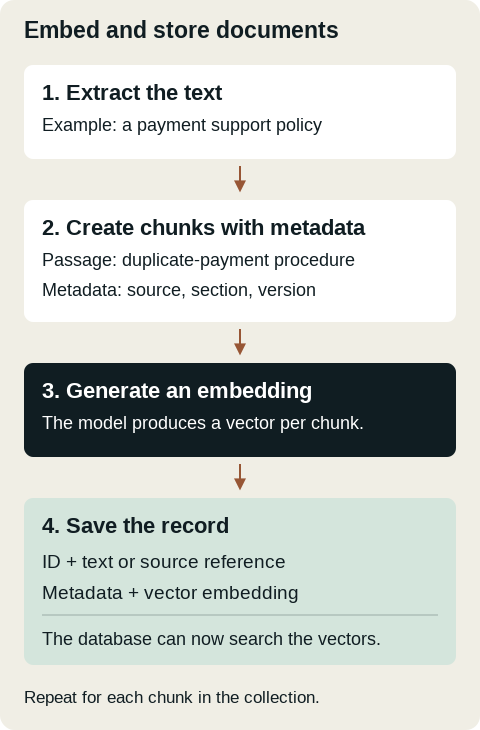
The first step is to extract usable text from the source material. Sources might include PDF files, help articles, policy documents, or product manuals. Scanned pages may need optical character recognition (OCR), and tables need care so that headings and values remain connected.
Long documents are usually split into smaller passages called chunks. A chunk becomes one searchable unit with its own embedding. A document with ten chunks will therefore typically produce ten stored vectors.
Headings and paragraphs often provide useful boundaries. For example, a payment policy could contain separate chunks for pending authorizations, duplicate settled payments, and refund processing times. Keep a rule together with the conditions needed to interpret it.
Chunk size depends on the documents, the embedding model’s input limit, and the questions people will ask. Some overlap between neighboring chunks can preserve context across a boundary. Testing with representative questions helps reveal whether important information is being split apart.
Add metadata to each chunk
Metadata connects a passage to its source and describes where it applies. It also supports filtering, updates, and source citations.
Here is an illustrative record before an embedding has been added:
id: payments-03
text: If two settled payments are confirmed, follow
      the duplicate-payment review process.
source: Payment support policy
section: Duplicate payments
product: Cedar Desk
language: en
version: 3
status: current
In document-processing libraries, a document object often means a text passage packaged with its metadata. One source file can become several such objects, each representing a chunk.
Stable IDs help an application update or remove the correct records later. Source references allow a search result to include a link to the original document or section.
Generate the embeddings
Each chunk is passed to an embedding model, which returns a numerical vector. Applications can generate these embeddings before sending them to the database. Some database products also offer integrations that run or call an embedding model as part of data ingestion. Qdrant: retrieval overview
The model determines the vector format and dimensionality. If it returns 384 components, the database’s vector configuration must accept that output. Keep a record of the model and its settings so that future document updates and search queries use compatible representations.
Connect and store the records
An application connects to the database using the product’s supported client, driver, or API. The connection settings normally identify the database location and, where required, provide authentication credentials. Credentials belong in protected application settings.
Next, the application creates or selects the table, collection, or index that will hold the records. The terminology differs between products. Typical configuration choices include vector dimensions and a similarity measure supported by the embedding model.
The application then writes each chunk’s ID, text or source reference, metadata, and embedding. Many systems provide an upsert operation, which inserts a new record or updates one with an existing ID.
A vector index organizes the stored vectors for searching. Exact search finds the nearest vectors under the selected comparison method. Approximate nearest-neighbor indexes, such as HNSW, can make large collections faster to search while potentially missing some neighbors that exact search would find. pgvector: indexing
Search with a question
When the customer asks “I was charged twice,” the application:
- Generates a query embedding using the model’s query settings.
- Searches the stored vectors using a compatible similarity measure.
- Applies relevant filters, such as the product and current policy version.
- Returns the matching passages with their source information.
Queries and document chunks must be represented in compatible spaces. Follow the model’s documented encoding methods; some models use different instructions for questions and documents. Sentence Transformers: semantic search
The requested number of results is often called top-k. For example, k = 5 asks for up to five highest-ranked matches, subject to filters and other search settings. The application can then assess whether those passages contain enough information to answer the question.
Use metadata to narrow the results
A support library may contain similar payment policies for several products. A product filter helps retrieve the relevant one. Other useful filters include language, publication date, and document status. Qdrant: filtering
Access permissions also matter. The application must enforce the authenticated user’s permissions before passing restricted passages to a user or an AI model. An access label in the metadata only provides protection when the application actually uses it to enforce those permissions.
Combine semantic and keyword search
Semantic search is useful for related wording, such as “charged twice” and “duplicate payment.” Keyword search is useful for exact terms such as product names, order numbers, or error codes.
Hybrid search combines these signals. A support application might use it to find a passage about duplicate payments for a specific product. An additional reranking step can examine the question and candidate passages together to improve their order. Sentence Transformers: retrieve and rerank
Use the retrieved passages in an AI assistant
Search results can be displayed directly as a list of articles. They can also be supplied to a generative model, along with the question, so it can compose an answer using the retrieved information. This is a common form of retrieval-augmented generation (RAG).
In the payment example, the assistant could explain the review procedure and link to the policy. Confirming that a duplicate payment actually occurred would additionally require the customer’s transaction records.
Read RAG and agentic RAG for the full answer-generation process.
Keep the collection up to date
When a source passage changes, regenerate its embedding and update the stored record. Remove retired content from active search results. Changing the embedding model may require generating new vectors for the collection so that queries and stored passages remain compatible.
Check retrieval with questions whose supporting passages you already know. Include paraphrases, exact identifiers, and questions the collection cannot answer. This helps you assess chunking, filters, and search quality before using the system with customers.
Check your understanding
Why is a long document divided into chunks?
Chunks let the system retrieve a relevant passage and stay within the embedding model's input limit. Useful boundaries preserve the context needed to understand each passage.
What does metadata add to a stored vector?
It describes the passage and its source. Fields such as product, version, and section help filter results, update records, and show source references.
What happens when a user submits a search question?
The application creates a compatible query embedding, searches the stored vectors, and returns matching passages with their metadata and source information.
For a practical walkthrough, continue with Chat with PDFs and documents locally.